

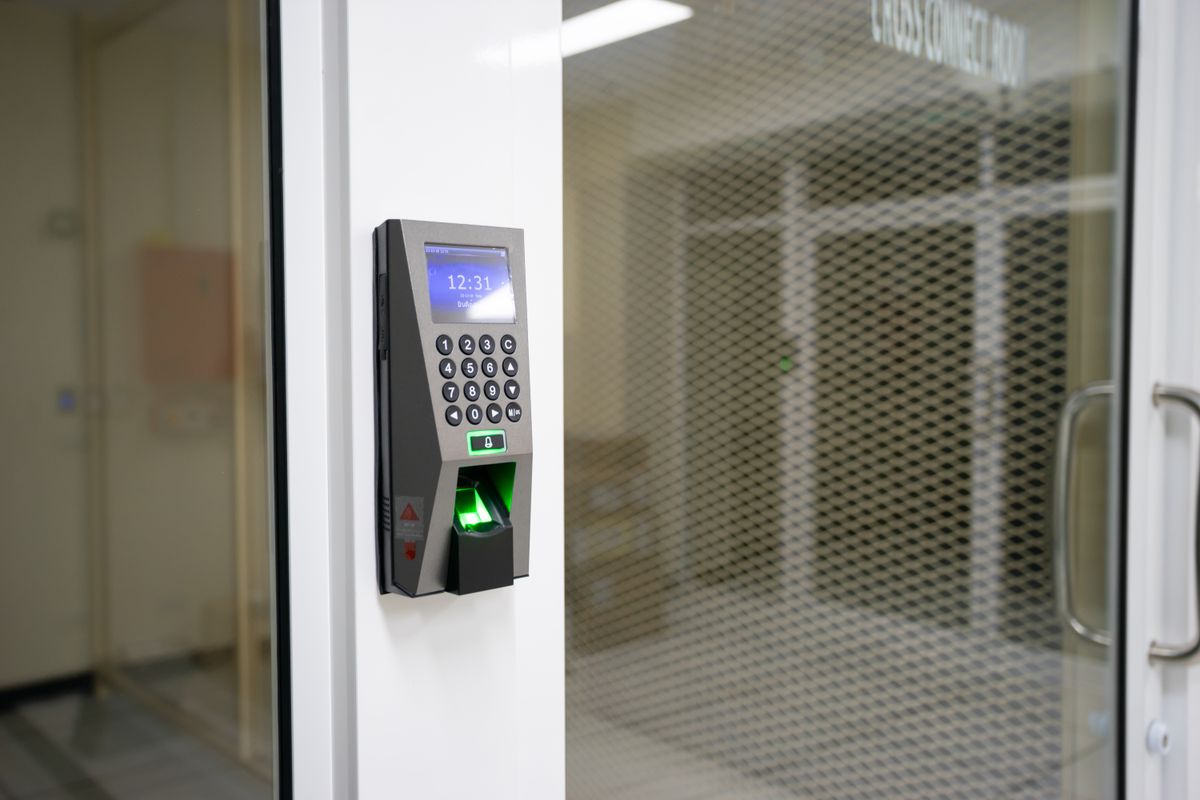
Keypads, Fobs, and Codes: Access Control for Small NYC Businesses
Marcus worked the counter at a dry cleaner on the Lower East Side for four years before he gave notice. Two weeks later he was gone, and so was one of three keys to the front door — cut for him years earlier when “just get a copy made” seemed like the fastest way to cover a Saturday shift. Nobody remembered how many copies existed by then. The locksmith who eventually came out to rekey the door didn’t ask why; he’d heard the same story from a bodega and a two-person accounting office that same month.
That’s the moment most small businesses actually start thinking about access control — not as an upgrade, but as damage control after a key didn’t come back. It’s a fine reason to start. The real question is what you switch to, because “just rekey again next time” is a policy, and not a great one.
Staff turnover is the real trigger
Nobody redesigns their front door because a trend told them to. It happens because a shift lead moved boroughs, a manager left on bad terms, or a franchise location changed hands and the outgoing operator’s keys never made it back to anyone’s desk. Physical keys don’t have a memory — a key cut three years ago works exactly as well as one cut yesterday, with no way to tell how many siblings it has out there.
If you’re still on keys and not ready to change hardware, at least track who holds what — see our guide to keeping a key control log alive through staff changes. At some point, usually after the second or third “I’ll mail it back” that never happens, the math stops favoring keys. Re-keying every departure is reactive: it fixes the one door you rekeyed, not the copies still out there from a departure two years back that nobody flagged.
What access control looks like at your size
“Access control” tends to conjure corporate lobbies with turnstiles and a security desk. For a bodega, a boutique office, a franchise coffee shop, or a two-suite floor in a walk-up, the realistic options are smaller than that. Three tiers cover almost every small business I walk into.
Standalone keypad levers and deadbolts
These are self-contained locks: keypad, mechanism, and battery live in the lockset itself — no wiring, no software, no monthly bill. You program a handful of user codes plus a master directly at the lock, and that’s the entire system. For a single door, a back entrance, a storage room, or a small suite with one point of entry, this is often the right amount of technology: nothing to break but the lock itself, and nothing depending on building power or Wi-Fi.
The tradeoff is management. Deleting one person’s code means standing at that door and reprogramming it, and with several of these locks across a few doors, you’re tracking whose code is whose in your head or a spreadsheet — a lot like the key log problem, just without the metal.
Fob or card reader with an electric strike
This is a step up in hardware: a reader at the door, an electric strike or maglock in the frame, low-voltage wiring, and a small controller deciding which credentials open which doors. It’s an install job, not a weekend project — plan on an electrician or access-control installer. In return you get a credential harder to informally hand off than a four-digit code, plus one place to manage every door on that controller.
For one location with several doors under a single roof — an office suite, a warehouse with a loading entrance and a front door, a franchise unit with a back-of-house — this tier usually beats wiring every door as its own smart lock. The catch: most of these systems stay local to the building unless networking is added on top, so revoking a fob from across town isn’t automatic unless you’ve built for that.
Cloud or app-based systems
These connect the door hardware to an app or dashboard over Wi-Fi or cellular. You issue and kill credentials from a phone, schedule the cleaning crew’s code for before-hours only, and see a log of who came through which door and when. Running more than one location — a case we’ve covered for owners weighing a second location’s locks and access — is where cloud systems earn their keep, letting one manager run every site from a single screen.
The honest tradeoff: you’re now depending on the internet, the vendor’s servers, and an app staying current — more that can go wrong than a standalone keypad, plus an ongoing subscription rather than a one-time purchase. For a single-door business, I’ll often say plainly that the offline keypad is the more reliable pick: fewer parts, fewer things to fail. Cloud earns its complexity with multiple doors, multiple sites, or a real need to cut off access instantly, wherever you’re standing.
Revoking access in seconds vs. re-keying after every goodbye
This is the actual argument for switching, stripped of any sales pitch: with a mechanical key, the only way to guarantee someone can’t get back in is to change the lock — scheduling a visit, cutting new keys, redistributing them to everyone still supposed to have access. With a code or a fob, you delete one credential and everyone else’s keeps working. One person leaves, one line gets removed, and the door stays exactly the same for everyone else.
That difference matters most in businesses with real turnover — retail, food service, franchise operations with part-time staff cycling through. A shop that’s re-keyed its front door four times in two years has spent more on rekeying visits than a keypad would have cost to install once. More importantly, the gap between someone leaving and their access actually ending shrinks from “whenever we get around to calling a locksmith” to the same day — sometimes before they’ve cleared the parking lot — an assurance a photocopied key can never give you.
What happens when the power goes out
Every electronic lock answers one blunt question: what does this door do if it loses power? There are two possible answers, worth knowing even though the actual decision belongs to whoever designs and installs your system, in coordination with fire and building code — not something to pick by feel.
Fail-secure means the door stays locked when power is cut — electricity is what unlocks it, so no power means no unlocking. Common on doors where security matters more than there being an alternate way out, like a storage room or a server closet. Fail-safe means the opposite: the door unlocks when power drops. That’s the answer required on doors along a path people use to exit the building, so a power failure — or a fire alarm cutting power on purpose — never traps anyone behind a locked door.
Which one applies to which door isn’t a preference call — it follows from whether that door sits on your egress path, governed by fire and building code rather than convenience. We’ve laid out the broader egress logic — what has to stay free no matter what lock is on it — in our guide to panic bars and egress basics. The short version: this is exactly the kind of question your installer should walk through door by door, not decide after the hardware’s already on the frame.
How a locksmith actually plans this
A good access control install starts with a walk-through, not a hardware catalog. The questions are the same ones that shape a master key system’s zones and hierarchy — who needs access to what, and how far that access should reach — just answered with codes and credentials instead of cuts on a key blank.
- Which doors need control — usually the exterior entrances, maybe a back-of-house door or a room with sensitive inventory, rarely every interior door
- Who needs which zone — a shift lead needs the front door, cleaning crew needs it on a schedule, a manager needs everything, a cashier needs one door and nothing else
- How credentials get issued and retired — the same day someone starts, the same day they leave, with a record of who approved it
- What the fallback is — battery life, backup power, and what happens the morning your internet is down
That last point is where self-installed systems often go wrong — someone orders hardware online, wires it themselves, and only discovers the gaps (a door wired fail-secure that should have been fail-safe, a controller with no backup battery) after something goes wrong. This is commercial locksmith work for a reason: the value isn’t just mounting hardware, it’s catching the door everyone forgot during the walk-through.
The physical override that never goes away
Whatever you install, keep a mechanical key cylinder on the door as an override. Batteries die, apps glitch, controllers outlast their backup power, and a locked-out staff member before coffee is not the morning to discover there’s no way in but a dead app. Every legitimate keypad and fob system worth installing keeps a physical key path for that reason — not a downgrade, but the fallback that makes the rest of the system safe to rely on.
This is also where hybrid setups make sense: front-of-house gets the fob reader or keypad, since that’s where turnover and shared access are the real problem, while back-of-house spaces — a mechanical room, a shared roof access, a landlord-controlled utility closet — often stay simpler on a well-documented master key system with a tight list of who holds which key. You don’t need to electrify every door — just the ones where staff turnover actually happens, like the front entrance, the till, and the stockroom — leaving everything else on a key hierarchy someone still tracks on paper.
Start with the door that worries you most. If it’s the one Marcus still might have a key to, that’s your answer.
If you manage buildings or run a business and want this handled as an ongoing arrangement rather than one-off calls, see how we work with property managers and business accounts — certificate of insurance on request, net-30 invoicing, and priority scheduling for recurring clients.
Written by Mykhailo — NYC DCWP-licensed locksmith, FixMate Locksmith. Serving all five boroughs, around the clock.
Who has a key to your business right now — are you sure?
Request a quote · Master key systems
Price named and confirmed before any work starts. No surprises at the door.